Electric Scooter Universal App
- 3.0
- Rating
- 100.00K
- Installs
- Free
- Price
 Analysis by App-foxy
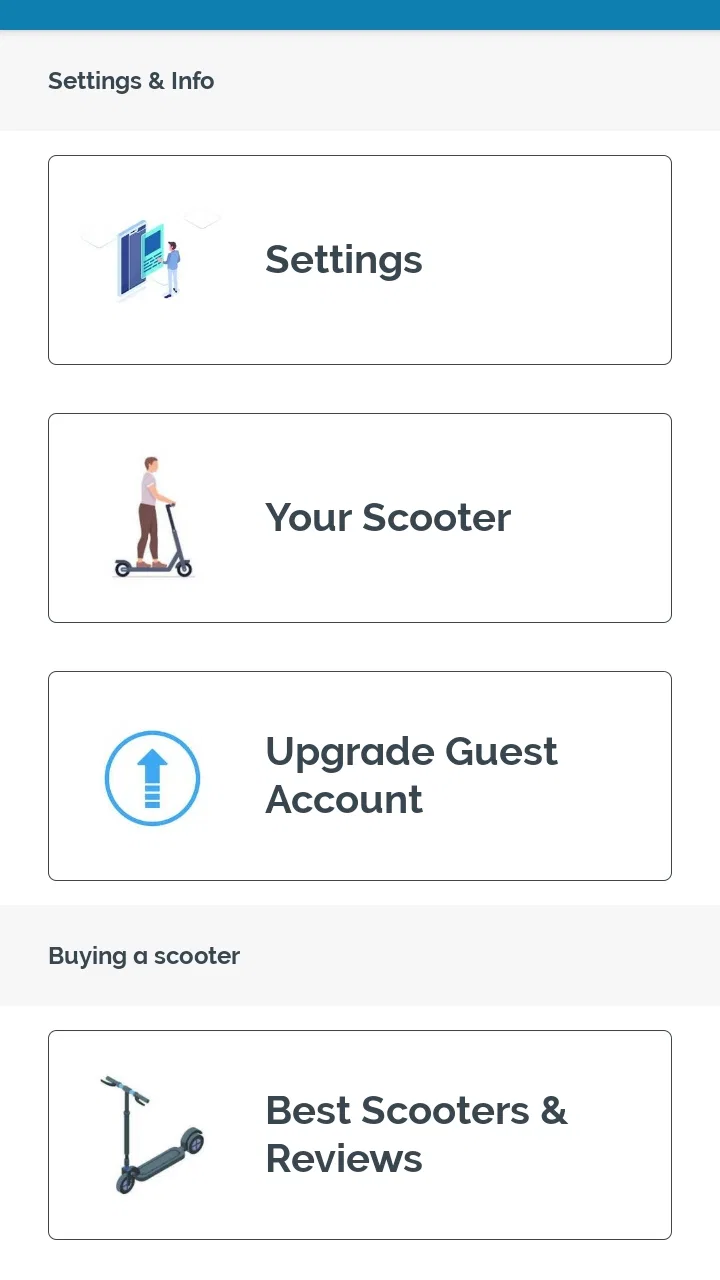
I approached Electric Scooter Universal App as a practical companion for someone who already owns an electric scooter and wants more than a basic ride. Its most useful idea is the way it gathers several ownership tasks in one place: reference lists, riding and maintenance tips, simple tools, and spaces related to buying or selling. That combination makes it feel less like a dedicated dashboard for one scooter brand and more like a general-purpose notebook for the wider electric-scooter community.
That distinction matters. I would not install this expecting it to replace the official application supplied by a scooter manufacturer. I see it as a supporting app for the moments around ownership: checking something before a trip, comparing options before a purchase, finding a reminder when a problem appears, or preparing a scooter for sale. If you use it with that expectation, its purpose becomes much clearer.
A broad helper rather than a brand-specific dashboard
The app belongs to the Auto & Vehicles category and is developed by Learning, Education, Improvement Apps & Courses. It is free to use, rated for Everyone, and works on devices running Android 7.0 or later. The current release is version 4.4.1, and the app has passed the 100K+ install mark. Its average rating is 3.1 from around 463 ratings, with roughly 40 written reviews, so the public response is mixed rather than overwhelmingly enthusiastic.
You May Also Like

 Google Keep - Notes and lists
Google Keep’s Quiet Growth Shows the Appeal of Simpler Notes
As mobile work gets busier, Google Keep keeps winning a simple contest: capture a thought quickly, find it later, and get on with the day.

 Blood Strike: 2.5 Anniversary
Blood Strike’s Loadouts Turn Every Drop Into a Tactical Gamble
A close look at Blood Strike’s custom loadouts: how fast access to signature weapons reshapes its battle royale rhythm, rewards preparation, and narrows the gap between fights.

 Pandora - Music & Podcasts
Pandora’s Music Is Easy to Start, but Harder to Recover
Pandora’s strength is its low-effort path from a seed to a station. Its weak spot is how much confidence it asks you to place in connection, setup, and quiet recovery.

 8 Ball Pool
 Is Built on Rivalries, Rematches, and Routine
A close look at the rivalries, rematches, shared routines, and unanswered safety questions that turn a quick pool match into a persistent mobile community.

 Samsung Music
’s Quiet Strength Is Playing What You Already Own
Its reach comes less from spectacle than from dependable access to a personal library. That simplicity is both the app’s strongest retention engine and its ceiling.

 AccuWeather: Weather Radar
AccuWeather Review: A Quick, Clear Forecast for Everyday Decisions
For everyday plans, the best forecast is the one you can understand quickly. AccuWeather makes rain timing, radar, and local conditions easy to act on, with a few trade-offs.
More From Our News Desk



I think the central capability is its universal reference approach. Instead of focusing on one manufacturer’s account system, it brings together information and tools that can be useful across different electric scooters. For an owner with a popular model, an older model, or a scooter bought second-hand, that wider viewpoint can be more convenient than searching through separate brand pages each time a small question comes up.
The word “universal” should still be interpreted carefully. It does not mean every scooter behaves identically, and it should not encourage you to treat a general tip as a substitute for your own model’s manual. Battery layouts, tire types, charging procedures, folding mechanisms, and braking systems can differ considerably. I would use the app to organize my thinking and identify what to check, then confirm model-specific details through the scooter documentation when safety or compatibility is involved.
Why the combined format is useful
Most scooter owners divide their research between several places. One source explains maintenance, another lists products, a marketplace handles buying and selling, and a manufacturer app manages the scooter itself. The appeal here is reducing that scattered feeling. A person can move from learning material to a practical tool, then to a buying or selling task, without treating each activity as a completely separate project.
That is especially helpful for new owners. When I first think about an electric scooter, I am not only asking how to ride it. I also want to know what to inspect, what equipment may be sensible, how to judge a used example, and which small problems deserve attention. An app that places those questions beside each other can make ownership feel more manageable.
The trade-off is depth. A broad app can cover more situations, but it may not offer the detailed telemetry, firmware controls, route recording, or model-specific diagnostics found in a manufacturer’s companion application. Its strength is breadth and convenience, not necessarily technical control over the scooter.
Using the lists before making a decision
The lists are more valuable when I treat them as decision aids rather than shopping instructions. Before buying a used scooter, I would write down the points I need to inspect and use the app as a prompt to slow down. That changes the buying process from “does it look clean?” to “have I checked the condition, the practical equipment, and the signs of neglect?”
A useful habit is to divide the list into three groups: things that can stop a ride immediately, things that affect comfort or convenience, and things that may influence the price. This makes the information easier to apply during a short viewing. It also helps prevent a shiny exterior from distracting me from more important concerns.
The same method works when selling. Instead of writing a vague advertisement, I would use the app’s general ownership focus to prepare a more honest description. I could note the scooter’s condition, explain what is included, and separate cosmetic marks from functional issues. That does not guarantee a successful sale, but it can reduce misunderstandings and make the listing more useful to a serious buyer.
What using it feels like in everyday ownership
In practice, I would open this app when I have a question that is too small for a repair shop but too important to ignore. For example, imagine I am preparing for a morning commute and notice that the scooter feels different after being stored for several days. Rather than immediately guessing at the cause, I would use the app’s tips and tools to create a short inspection routine. I could check the obvious areas, compare the issue with the guidance available, and decide whether the scooter is suitable for a short ride or needs closer attention first.
That workflow is more useful than simply browsing articles without a goal. The app becomes a prompt for action: identify the concern, consult the relevant material, perform only the checks I understand, and stop when the issue moves beyond basic ownership knowledge. For me, the important benefit is not that the app magically diagnoses everything. It helps turn a vague worry into a sequence of sensible questions.
I would also use it before visiting a seller. A short checklist on a phone is easier to follow than trying to remember every concern while standing beside a used scooter. The buyer can look at the overall condition, ask direct questions, and avoid making a rushed decision based solely on price or appearance. This is one of the less obvious ways a general helper can provide value: it improves preparation, which is often more important than having one advanced feature.
A practical routine for new owners
For someone who has just purchased a scooter, I recommend using the app in stages rather than trying to consume everything at once. Start with the basic ownership material and identify the checks that should become part of a regular routine. Then explore the tools when a specific need appears. Finally, return to the buying and selling sections only when you are comparing another scooter or preparing your own for a future owner.
This staged approach avoids a common problem with reference apps: opening them, seeing many topics, and closing them without changing anything. I get more from the app when I connect each visit to a real task. Before riding, I look for preparation advice. When comparing a used scooter, I focus on evaluation. When planning a sale, I concentrate on presentation and relevant details.
Another useful habit is to keep the app in a supporting role. I would not make a maintenance decision purely because a general tip sounds convenient. If the advice involves electrical components, charging, braking, or a structural part, I would use the app to understand the issue and then consult the scooter’s own instructions or a qualified technician. This is not a weakness unique to this app; it is the sensible limit of general-purpose guidance.
Where the tools fit—and where they do not
The presence of tools is appealing because it suggests a more active experience than a collection of articles. A tool can help a user apply information instead of merely reading it. In my experience, that is most useful when the task is repetitive or when I need a quick reference while making a decision.
However, I would judge each tool by the question it answers. A general calculator or reference aid may be convenient, but it cannot know every detail of a particular scooter unless those details are entered accurately and the tool is designed for that purpose. I would therefore check the inputs carefully and treat the result as guidance. A quick answer is useful only when the underlying assumptions match the scooter I am actually using.
This is also where the app differs from a dedicated manufacturer application. A brand app may connect directly to the scooter and show information specific to that device. Electric Scooter Universal App is more attractive when I want a broader ownership perspective, especially if I have changed brands, own a second-hand model, or am still deciding what to buy.
The strongest scenario: buying or selling a used scooter
The clearest everyday use case for me is the second-hand market. A buyer often needs help before the transaction, not after it. The app’s combination of lists, tips, tools, and buy-and-sell material can support that preparation in one session. I would review the relevant points before meeting the seller, then use them to guide the conversation and inspection.
There is a subtle advantage here: the app can help a buyer notice the difference between a problem that affects convenience and one that affects safe use. That distinction matters when negotiating. A cosmetic scratch may be acceptable, while an unexplained braking issue deserves much more caution. A general resource cannot replace a professional inspection, but it can help an inexperienced buyer ask better questions.
For sellers, the same capability encourages clearer communication. I would prepare the scooter before photographing it, gather the relevant information, and describe the condition without hiding inconvenient details. A well-prepared listing saves time for both sides. It can also make the seller appear more trustworthy because the description answers practical questions instead of relying on enthusiastic language.
If your only goal is to browse local listings, a dedicated marketplace will probably be faster and more active. The advantage of this app is not necessarily the size of its marketplace; it is the surrounding ownership context. It helps connect the decision to the checks and knowledge that should come before handing over money.
The compromises I noticed before recommending it
The average rating of 3.1 tells me to keep expectations realistic. I would not describe the experience as a polished replacement for every scooter-related service. A broad resource depends heavily on how clearly its material is organized and how consistently its tools remain useful across different models. If you want a single, highly refined function, a specialized app may feel more direct.
The first friction point is generality. Advice written for a wide audience can be too cautious for an experienced owner and too brief for a complete beginner. A new rider may still need to search for model-specific instructions, while a technically confident user may find the general material obvious. The app works best in the middle: owners who want practical prompts and a convenient starting point.
The second trade-off is that several activities share the same space. Lists, tips, tools, and buying or selling features are related, but they do not all serve the same purpose. I would expect to spend a little time learning where the useful material is located. That is a reasonable cost for having a wider toolkit, although users who prefer a minimal interface may find the range distracting.
The third limitation concerns trust and responsibility. A general helper can improve preparation, but it cannot inspect a scooter in person or guarantee that a repair is safe. I would never use it as permission to experiment with a battery, bypass a safety system, or continue riding when a serious fault is present. For those situations, a qualified repair professional and the manufacturer’s guidance are better choices.
There is also a practical question about whether you need an app at all. An experienced owner who already has a reliable maintenance routine, knows the scooter’s manual, and uses a preferred marketplace may gain little. In that case, this app could add another layer rather than solving a real problem. I would install it when I want a general reference point, not simply because it belongs to the electric-scooter category.
How it compares with the usual alternatives
The most obvious alternative is the official app for your scooter brand. That option is usually the better fit when you need device-specific information or controls. It is designed around one product family, so it can be more precise for settings and scooter status. The universal app is better suited to broader ownership questions, especially when the scooter is used, the brand’s app is limited, or you are comparing several models.
Another alternative is a collection of web searches, videos, and community discussions. That route can provide more varied opinions, but it also requires more effort to filter useful advice from confident guesses. I like the idea of having lists and tools gathered in a dedicated app because it reduces the number of places I need to check. The downside is that I still need judgment; a convenient format does not automatically make every recommendation appropriate for my scooter.
A dedicated marketplace is stronger for transaction volume and local discovery. If I am actively trying to buy or sell today, I would probably use one alongside this app rather than instead of it. The marketplace handles contact and listings, while the universal helper supports the preparation, inspection, and description work around the transaction.
Finally, a repair shop or experienced technician remains the better option for faults involving safety, electrical systems, or structural damage. The app can help me explain the problem more clearly and arrive with better questions, but it should not be treated as a remote substitute for professional judgment.
Who will get the most from this app
I would recommend it most strongly to new electric-scooter owners, second-hand buyers, casual sellers, and riders who have moved between brands. These users benefit from a broad reference point because they may not yet have a personal system for checking, comparing, and preparing a scooter. The free price also makes it easy to try without committing to a paid service.
It can also suit a practical owner who likes keeping information close at hand. If you prefer to prepare before a purchase, consult a checklist before a ride, and organize questions before speaking with a repairer, the app has a sensible role. Its value grows when you use it around real decisions instead of opening it only to browse.
I would be more cautious about recommending it to advanced riders who want detailed telemetry, route analysis, or deep control over a specific scooter. Those needs point toward a manufacturer application or a specialized riding tool. I would also steer away from relying on it alone if you are looking for authoritative repair instructions for a serious fault.
The age rating of Everyone makes it approachable for a wide audience, but that should not be confused with every task being suitable for every user. A younger or inexperienced rider may still need adult supervision and proper safety instruction when checking a scooter. The app can support learning, while responsible handling remains essential.
My verdict after using its main idea
The real strength of Electric Scooter Universal App is not one spectacular function; it is the practical connection between learning, checking, and making ownership decisions. I find that useful because electric-scooter ownership involves many small choices outside the ride itself. A broad helper can make those choices less scattered, particularly when buying used or preparing a scooter for someone else.
At the same time, I would keep the app in its proper lane. It is not the first choice for brand-specific controls, professional diagnosis, or a highly specialized riding dashboard. Its mixed public rating reflects why expectations matter: the experience is likely to be most satisfying for people who want a general companion, not a complete technical command center.
For me, the deciding question is simple: do you regularly need a place to review scooter tips, use practical tools, or prepare for a purchase or sale? If yes, the free app is worth trying, especially on an older Android device because its minimum requirement is Android 7.0. If your needs are already covered by an official brand app and a trusted marketplace, you may not notice enough added value.
I would keep it installed during the early stages of ownership and during any second-hand buying or selling process. Used thoughtfully, it can help turn scattered scooter questions into a more organized routine. That is a modest promise, but in everyday use it is the kind of modest help that can prevent rushed decisions and make electric-scooter ownership easier to manage.
FAQs for Electric Scooter Universal App
01What features does the Electric Scooter Universal App offer?
The Electric Scooter Universal App offers a range of features designed to enhance your scooter experience. It includes GPS tracking, battery status monitoring, speedometer, and route planning. Additionally, it allows users to lock and unlock their scooters remotely and provides maintenance alerts to ensure your scooter stays in top condition.
02Is the Electric Scooter Universal App compatible with all scooter models?
The app is designed to be compatible with most major scooter brands and models. However, compatibility may vary depending on the scooter's firmware and Bluetooth capabilities. It is recommended to check the app's compatibility list or contact the manufacturer for confirmation before downloading.
03How user-friendly is the Electric Scooter Universal App?
The app is designed with a clean and intuitive interface, making it easy to navigate for users of all tech levels. It offers simple setup instructions, and features are clearly labeled. The app also includes helpful tutorials and a customer support feature to assist users with any issues they may encounter.
04Does the Electric Scooter Universal App require an internet connection to function?
While some features such as GPS and real-time tracking do require an internet connection, many basic functions like speedometer and battery monitoring can operate offline. However, for the best experience and to access all features, a stable internet connection is recommended.
05Is my data secure when using the Electric Scooter Universal App?
The app prioritizes user privacy and data security by implementing strong encryption and secure authentication protocols. User data is stored securely and is not shared with third parties without consent. Regular updates are released to address any security vulnerabilities and enhance data protection.
Pros
- User-friendly interface
- easy to navigate.
- Supports multiple scooter brands seamlessly.
- Real-time tracking for enhanced safety.
- Customizable settings for personalization.
- Low battery alerts to avoid disruptions.
Cons
- Limited offline functionality.
- Occasional connectivity issues.
- Requires frequent updates.
- Some features locked behind paywall.
- Battery drain on older devices.

Electric Scooter Universal App
Gallery